Your website rankings just dropped 15 positions overnight. Your organic traffic fell by 30%. You’re panicking.
Was it something you did wrong? Did a competitor outrank you? Or did Google just change its algorithm again?
Most website owners never see algorithm updates coming. They react after the damage is done. Their traffic crashes before they even know what hit them.
But competent SEO professionals use a different approach. They track Google algorithm updates in real time. They spot changes before rankings drop. They protect their websites proactively.
The tool they use is called Semrush Sensor.
Semrush Sensor monitors Google’s search results every single day. It detects algorithm updates as they roll out. It shows you exactly when Google changes its ranking algorithm.
In this complete guide, you’ll learn how to use Semrush Sensor to track Google algorithm updates. You’ll discover how to read the signals, understand what they mean, and take action before your rankings suffer.
No more guessing. No more panic. Just precise data and wise decisions.
Let’s dive in.
What Is Semrush Sensor and How Does It Work?
Semrush Sensor is your early warning system for Google algorithm updates.
Think of it like a seismograph for search results. It detects tremors and earthquakes in Google’s rankings before most people notice them.
Here’s how it works. Semrush tracks thousands of keywords across dozens of industries every single day. It monitors the top 10-20 search results for each keyword. Then it compares today’s results with yesterday’s results.
When rankings shift significantly across many keywords, Sensor detects the volatility. It calculates a score from 0 to 10 based on how much it has changed.
A low score means things are calm. A high score means Google just rolled out an algorithm update.
The tool runs these calculations separately for each country and industry. So you get data specific to your target market.
How to Use Semrush Sensor
Your website rankings dropped overnight. Traffic vanished. You have no idea why.
Google changes its algorithm constantly. Most updates happen without warning. By the time you notice the damage, it’s too late.
Here’s the problem most website owners face. They wake up to crashed rankings with zero explanation. Their traffic is gone. Their revenue disappeared. And they’re left scrambling to figure out what went wrong.
But what if you could see these changes coming? What if you had an early warning system that detected algorithm updates before they hurt your rankings?
That’s exactly what Semrush Sensor does.
Semrush Sensor tracks Google’s search results every single day. It monitors thousands of keywords across every industry. It detects volatility spikes that signal algorithm updates. And it gives you early warnings before your rankings crash.
Think of it as your SEO radar. While everyone else reacts after the damage is done, you spot problems early and protect your website proactively.
This complete guide shows you exactly how to use Semrush Sensor. You’ll learn to read volatility scores, understand SERP changes, spot algorithm updates in real time, and take action before your traffic disappears.
No more guessing. No more panic. Just clear data and smart decisions.

Why Do Google Algorithm Updates Matter for Your Website?
Google algorithm updates can make or break your online business.
Here’s what happens during a major update. Google changes how it evaluates websites. Maybe it starts prioritizing page speed more. Or it cracks down on thin content. Or it rewards sites with a better user experience.
If your website aligns with the new priorities, your rankings improve. More traffic flows in. You get more customers.
But if your website violates the new rules, your rankings tank. Traffic disappears. Revenue drops.
Real businesses experience dramatic changes during updates:
A health website lost 60% of its traffic after a core update because it lacked medical expert authors.
An e-commerce store saw 150% more organic traffic after a page experience update, thanks to excellent site speed.
A local business dropped from position 2 to 15 after a local algorithm update due to an incomplete Google Business Profile.
These aren’t small changes. They’re business-altering shifts that happen without warning.
That’s why tracking Google algorithm updates matters. You need to see changes coming before they hurt you.
How Do You Read the Semrush Sensor Volatility Score?
The Sensor score is simple. It ranges from 0 to 10. Here’s what each range means:
0 to 2: Very Low Volatility Search results are stable. No algorithm updates are happening. Your rankings should remain consistent unless you make changes to your site.
2 to 4: Low Volatility Minor fluctuations in search results. This is a typical daily variation. Not a cause for concern.
4 to 6: Normal Volatility, Typical day-to-day changes. Google always makes minor tweaks. This range is business as usual.
6 to 8: High Volatility Significant changes detected. A Google algorithm update is likely rolling out right now. Check your rankings and traffic immediately.
8 to 10: Very High Volatility Major algorithm update confirmed. Massive ranking shifts across many industries. This is red alert territory.
Here’s the crucial point. A high score doesn’t mean YOUR website is affected. It means significant changes are happening across Google. You might go up, down, or stay the same.
Always check your own rankings alongside the Sensor score.
What Are the Different Types of Google Algorithm Updates?
Google releases several types of algorithm updates. Each type targets different aspects of search quality.
Core Updates
Core updates are broad changes to Google’s overall ranking algorithm. They happen every few months. Core updates can affect any type of website in any industry.
Google describes core updates as efforts to reward quality content. Sites with helpful, authoritative, and trustworthy content often rank higher. Sites with thin or low-quality content usually lose rankings.
Recent core updates include the March 2024 and August 2024 Core Updates.
Helpful Content Updates
These updates target content written primarily for search engines rather than humans. Google wants to demote content that exists solely to rank well, rather than actually help users.
Sites with helpful, experience-based content gain visibility. Sites with generic, AI-generated, or low-value content lose rankings.
Spam Updates
Spam updates crack down on manipulative SEO tactics. This includes link spam, keyword stuffing, cloaking, scraped content, and other violations of Google’s guidelines.
These updates can result in manual penalties or algorithmic demotions.
Product Reviews Updates
These updates specifically affect review content. Google wants authentic, detailed reviews based on firsthand experience. Generic affiliate reviews with no original research get demoted.
Page Experience Updates
These focus on user experience signals like Core Web Vitals, mobile-friendliness, safe browsing, and HTTPS security. Sites with excellent user experience gain advantages.
Local Algorithm Updates
Google frequently updates local search rankings. These affect how businesses appear in map results and local packs. Factors include Google Business Profile optimization, reviews, proximity, and local citations.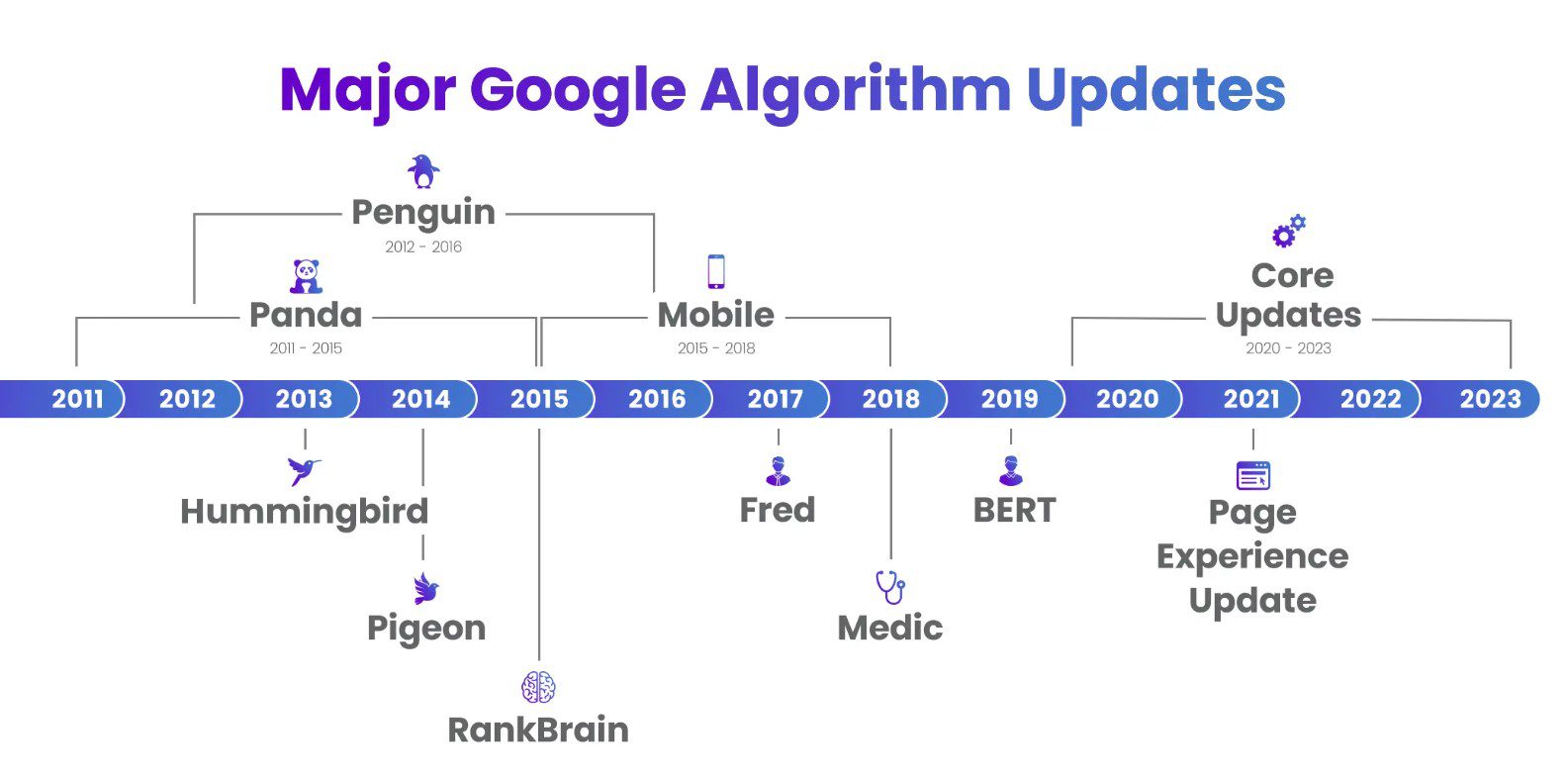
How Do You Use Semrush Sensor to Detect Algorithm Updates?
Here’s your step-by-step process for using Semrush Sensor effectively.
Step 1: Check Sensor Daily
Make Sensor part of your morning routine. Log in to Semrush and navigate to the Sensor tool. Check the current volatility score for your target country.
This takes 30 seconds but gives you critical early warning.
Step 2: Filter by Your Industry
Don’t just look at the overall score. Click the industry filter and select your niche. Health, finance, e-commerce, travel, whatever fits your website.
The overall score might be 5, but your industry might show 8. That means the update specifically targets your site type.
Step 3: Review SERP Feature Changes
Click on the deviations section. This shows changes in specific search result features:
- Featured snippets
- Local packs
- Video carousels
- People Also Ask boxes
- Shopping results
- Image packs
If featured snippets dropped 25%, Google changed how it selects answer boxes. If video carousels increase by 30%, video content will become more prominent.
These deviations reveal what type of algorithm update is rolling out.
Step 4: Check Winners and Losers
The Winners and Losers section shows which domains gained or lost the most rankings during high volatility.
Look for patterns. Are all the winners fast-loading sites? Do all the losers have thin content? Are the winning sites showing more expertise signals?
These patterns tell you what Google is rewarding or penalizing.
Step 5: Compare with Your Rankings
Now open your Position Tracking data in Semrush. Look at your keyword rankings over the last 7 days.
Did your rankings change when Sensor volatility spiked? If yes, the algorithm update affected you. If your rankings stayed stable despite high volatility, you’re safe.
Step 6: Cross-Check with Analytics
Open Google Analytics and Google Search Console. Check your organic traffic and impressions for the same period.
If traffic dropped when the Sensor spiked, you were negatively impacted. If traffic increased, you benefited from the update.
What Should You Do When the Sensor Shows High Volatility?
High volatility doesn’t mean panic. It means pay attention.
Follow this action plan:
Check SEO News Sources
Visit Search Engine Journal, Search Engine Land, and SEO Twitter. See if other professionals are reporting updated symptoms. Google sometimes confirms updates through its Search Liaison Twitter account.
Monitor Your Metrics
Watch these numbers closely:
- Organic traffic in Google Analytics
- Keyword rankings in Position Tracking
- Impressions and clicks in Search Console
- Conversion rates from organic traffic
Both Semrush and Google Analytics offer unique insights. Check out our detailed comparison of Semrush vs Google Analytics to understand which metrics to prioritize.
Track changes over 3 to 7 days. Algorithm updates take time to fully roll out.
Don’t Make Hasty Changes
This is critical. Don’t immediately redesign your site or delete content because Sensor shows 9 out of 10.
Wait until you see the actual negative impact on YOUR site. Many sites remain unaffected even during major updates.
Analyze What Changed
If your rankings did drop, investigate why. Look at the pages that lost rankings. Check for:
- Thin or low-quality content
- Poor user experience signals
- Slow page speed
- Lack of expertise signals
- Technical SEO issues
- Weak backlink profiles
Compare your pages to the ones that outrank you now.
Make Strategic Improvements
Based on your analysis, improve your site strategically:
Add more depth and value to thin content. Include expert opinions, original research, and helpful examples.
Improve page speed using tools like Google PageSpeed Insights. Optimize images, reduce code, and use caching.
Enhance E-E-A-T signals. Add author bios with credentials. Link to authoritative sources. Show real experience.
Fix technical issues found in Site Audit. Resolve crawl errors, broken links, and mobile problems.
Update outdated content. Refresh old articles with current information and better formatting.
How Do You Set Up Alerts for Google Algorithm Updates?
You can’t check the Sensor every hour. That’s where alerts help.
Semrush lets you create custom notifications. When volatility reaches your threshold, you get an email or push notification.
Go to Sensor settings and set up an alert. Most SEO professionals choose a threshold of 7 or higher. This catches major updates without flooding you with alerts for normal fluctuations.
You can set different alerts for different countries if you target multiple markets.
When an alert fires, follow the action plan above. Check your metrics, investigate changes, and respond strategically.
How Does Semrush Sensor Help You Analyze Competitors?
A sensor isn’t just for tracking your own site. It’s powerful for competitive intelligence.
Add your main competitors to Position Tracking campaigns. When the Sensor shows high volatility, check how competitor rankings have changed.
Some competitors will gain rankings. Others will lose them. Study both groups.
Learning from Competitor Wins
When a competitor improves during an update, they did something right. Visit their website and analyze:
- Content quality and depth
- Page speed and user experience
- Mobile optimization
- Author expertise signals
- Recent content updates
- Backlink profile changes
These insights show you what Google currently rewards.
Spotting Competitor Weaknesses
When competitors drop during updates, they have vulnerabilities. These are your opportunities.
If a competitor lost rankings for essential keywords, create better content targeting those terms. Fill the gap they left behind.
Can You Predict Future Google Algorithm Updates?
You can’t predict precisely when Google will update. But you can spot patterns.
Semrush Sensor maintains historical data. Review past volatility spikes and note when they occurred.
Core updates typically happen every 3 to 4 months. If the last core update was 3 months ago, another might come soon.
Some industries see seasonal volatility patterns. Retail sites often undergo updates before the holiday shopping season.
By studying historical trends, you can anticipate likely update windows and proactively prepare your site.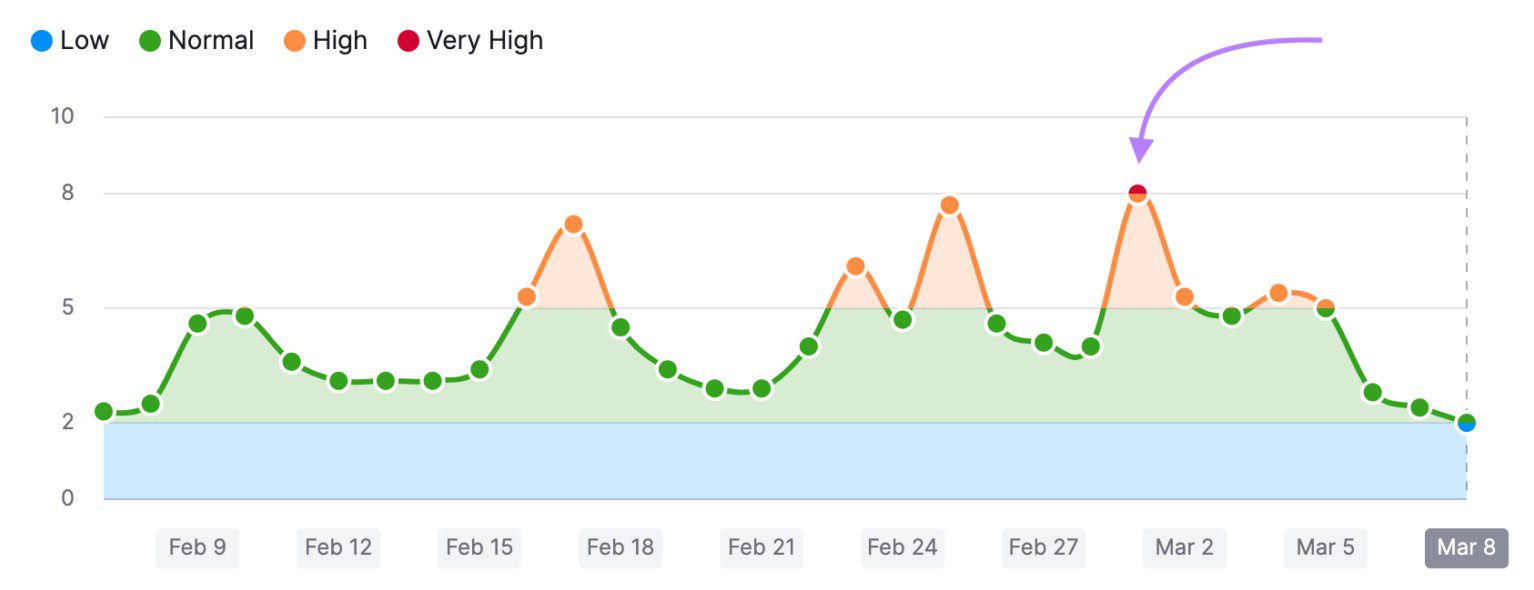
What Are the Most Important Google Algorithm Updates?
Understanding major past updates helps you recognize patterns.
Panda Update (2011)
Targeted thin, low-quality content. Sites with duplicate content or content farms were penalized. Lesson: quality over quantity matters.
Penguin Update (2012)
Cracked down on manipulative link building. Sites that buy links or use spammy anchor text lose rankings. Lesson: build natural backlink profiles.
Hummingbird Update (2013)
Improved understanding of search intent and context. Google started interpreting what users meant, not just matching keywords. Lesson: focus on intent, not just keywords.
Mobile-Friendly Update (2015)
Prioritized mobile-optimized websites. Sites without responsive design lost mobile rankings. Lesson: mobile experience is mandatory.
RankBrain (2015)
Introduced machine learning into ranking decisions. Google started learning which results satisfy users. Lesson: user satisfaction signals matter.
Core Web Vitals Update (2021)
Made page speed and user experience direct ranking factors. Sites with poor loading times, layout shift, or interactivity issues were demoted. Lesson: Technical performance affects rankings.
Helpful Content Update (2022)
Demoted content written for search engines rather than people. AI-generated, generic content without real value lost visibility. Lesson: write for humans first.
Each update reinforced Google’s core principle: reward sites that genuinely help users.
Ready to Track Google Algorithm Updates with Semrush Sensor?
Google algorithm updates will keep coming. That’s guaranteed.
You can’t stop the updates. But you can stop being blindsided by them.
Semrush Sensor gives you the visibility you need. It shows you when updates roll out. It helps you understand what changed. It protects your rankings before disaster strikes.
Thousands of SEO professionals rely on Sensor every day. They spot updates early. They respond strategically. They keep their websites stable even when Google shakes things up.
Now it’s your turn to take control.
Stop reacting to algorithm updates after your rankings crash. Start tracking them proactively with Semrush Sensor. Visit Semrush today and protect your website from the next Google algorithm update.
Frequently Asked Questions
How often does Google release algorithm updates?
Google makes thousands of small changes annually. Major algorithm updates like Core Updates happen every few months. Semrush Sensor helps you track both big and small changes.
Can Semrush Sensor predict when Google will update its algorithm?
No tool can predict future updates with certainty. However, the Sensor detects updates as they roll out, often before Google officially announces them, giving you an early warning.
What should I do if my rankings drop after an algorithm update?
Don’t panic. Wait 7 to 10 days for the update to fully roll out. Then analyze which pages lost rankings and why. Strategically improve content quality, user experience, and E-E-A-T signals.
How long does it take to recover from a negative algorithm update?
Recovery time varies. Minor issues might improve within weeks. Major problems could take months. Focus on fundamental improvements rather than quick fixes.
Does Semrush Sensor track updates for all search engines?
Sensor currently focuses exclusively on Google algorithm updates. Google represents the vast majority of search traffic, making it the priority for most SEO professionals.
What is the difference between core updates and other algorithm updates?
Core updates are broad changes affecting all types of sites and industries. Other updates, like Spam Updates or Product Reviews Updates, target specific issues or content types.
How accurate is Semrush Sensor at detecting algorithm updates?
The sensor is highly reliable. When volatility scores are above 7, there’s almost always a confirmed algorithm update underway. It has accurately detected every major update in recent years.
Should small businesses worry about Google algorithm updates?
Yes. Small businesses can lose significant revenue from ranking drops. Tracking updates with Sensor helps small business owners protect their visibility and traffic.
What are E-E-A-T signals, and why do they matter for algorithm updates?
E-E-A-T stands for Experience, Expertise, Authoritativeness, and Trust. Google increasingly uses these signals to evaluate content quality, especially after core updates and helpful content updates.
Can I use Semrush Sensor for free?
Sensor is part of the Semrush platform. You need a Semrush subscription to access full features. Some limited data may be available through free trials.
How do I know which algorithm update affected my site?
Check the Sensor’s SERP feature deviations and industry-specific data. These clues reveal the update type. Also, monitor Google’s official announcements for confirmed update names.
What’s the best way to prepare for future algorithm updates?
Focus on fundamentals: create high-quality, helpful content, maintain excellent user experience, build authoritative backlinks, and demonstrate expertise. Sites with strong foundations weather updates better.